

You know your truck stock process is working when techs rarely make trips back to the shop for parts, jobs aren’t delayed by missing parts, truck counts match the system, requests are filled quickly, and little stock sits unused. Track a few of these signals over time, and you’ll see whether things are getting better.
It’s easy to set up a process and assume it’s working because nobody is complaining. But the costs of a weak process are quiet: an extra trip here, a callback there, a part that went missing months ago. A few simple measures turn those quiet costs into something you can see. Our post on reducing trips back to the shop covers one of the biggest.
Five Signals to Watch
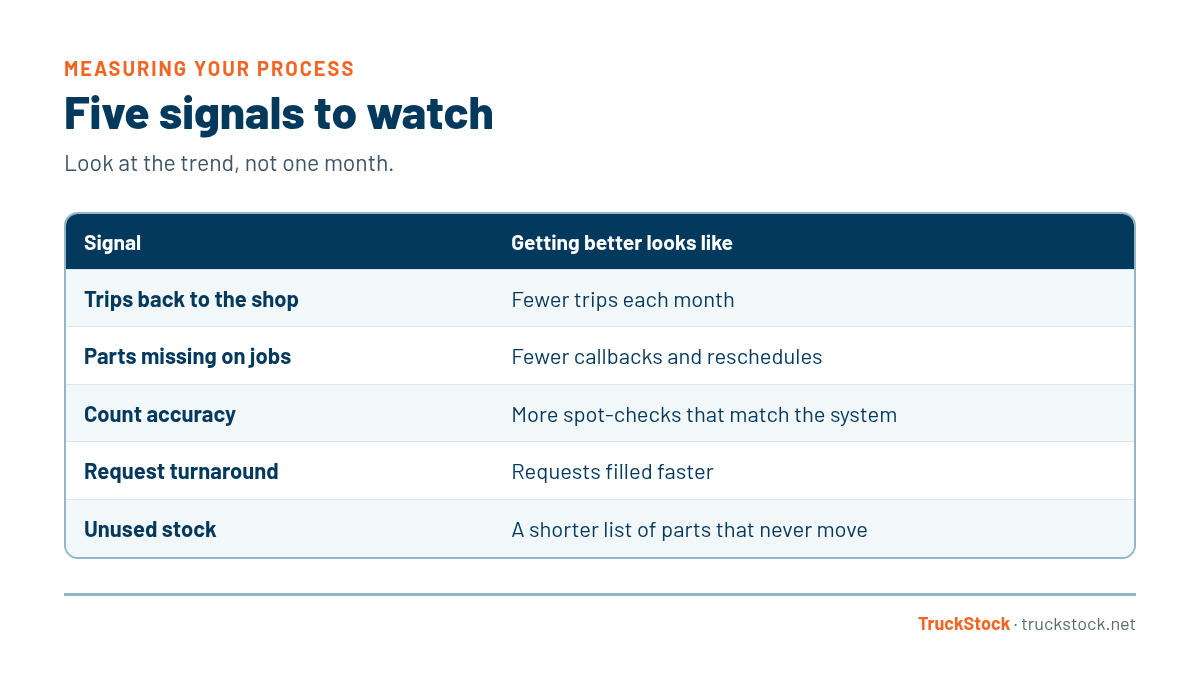
How to Measure Each One
1. Trips back to the shop
Ask techs to note when they have to leave a job for a part. Even a simple tally each week shows the trend. Fewer trips means trucks are carrying the right stock.
2. Parts missing on jobs
Track callbacks or rescheduled visits caused by a missing part. These are the most expensive misses, and each one points to a part that may need a higher max.
3. Count accuracy
When you spot-check a truck, note how many parts match the system. Over time, that number should climb. Our post on what to do when counts don’t match explains how to fix gaps.
4. Request turnaround
How long does it take from a tech’s request to the part being on the truck? If requests sit for days, the stockroom routine needs attention.
5. Unused stock
Look at parts that haven’t moved in months. If that list is growing, max levels need adjusting. Here’s how to reduce dead stock.
Why Simple Measures Work Best
You don’t need a dashboard full of numbers. A handful of signals, checked monthly, tells you most of what you need to know. The important part is looking at the trend, not any single month. One bad week isn’t a crisis. A steady climb in trips back to the shop is.
Share the results with your team, too. When techs see that trips back to the shop are going down, they understand why recording parts matters. That makes the process stronger, which shows up in the next month’s numbers.
A Quick Example
Picture a service manager who starts a simple monthly review. She tallies trips back to the shop from tech notes, spot-checks two trucks, and pulls a usage report to see which parts didn’t move. In the first month, trips are higher than she’d like and one truck’s count is off. She raises maxes on a few parts and talks with the team about recording transfers. Over the next few months, the trips tally drops and spot-checks come back cleaner.
Common Mistakes
- Assuming the process works because nobody complains.
- Tracking too many measures and never looking at them.
- Reacting to one bad week instead of the trend.
- Keeping the results from the team.
- Measuring without changing anything.
Start With a Baseline
Before you change anything, take a month to see where you are. Note trips back to the shop, spot-check a couple of trucks, and pull a usage report. That baseline is what you’ll compare against later.
Without a baseline, it’s hard to tell whether a change helped. With one, even a rough one, you can see progress month by month and show your team the difference their effort is making.
How TruckStock Handles It
- Items Requested report. See parts used by truck, job, date, department, part, or supplier, with an Excel download.
- Available Stock report. Compare what each truck holds against its max to find gaps and extras.
- Pending Request List. See requests that haven’t been filled yet, so slow turnaround is easy to spot.
- Current Truck Inventory. Check what’s on any truck for quick spot-checks.
Key Takeaways
- Watch a few simple signals, not dozens.
- Trips back to the shop and missing parts matter most.
- Spot-checks show count accuracy over time.
- Track how quickly requests are filled.
- Look at trends monthly and share them with the team.
Frequently Asked Questions
What is the best single measure of truck stock?
Trips back to the shop for parts. It reflects whether trucks carry the right stock and directly affects how many jobs techs can finish.
How often should I review these measures?
Monthly works well for most companies, with a closer look after busy seasons.
Do I need special software to measure this?
No, but software makes it much easier by recording usage, requests, and counts automatically.
What should I do if the numbers get worse?
Look for the cause, like a change in the work, a new tech, or max levels that no longer fit, and fix that first.
Want to see how your process is doing? Start a free TruckStock trial or contact our team.
Recent Comments