

Use the shoulder season to reset your truck inventory: count every truck, pull parts that haven’t moved since spring, reset max levels for the season ahead, and fill each truck back to its list. A few slow weeks spent on cleanup now means fewer missing parts and return trips when the first cold snap hits.
Fall is the slow stretch for a lot of HVAC shops. In How HVAC Contractors Can Stay Busy in the Shoulder Season, published October 22 in ACHR News, Will Merritt writes that call volume drops off significantly in September for most HVAC companies, and shares a plan to keep techs busy. Fewer demand calls also make it a good time to get your trucks in order.
The timing matters this year. ACHR News’ 2026-2027 Winter Weather Forecast, published October 26, says a historically strong El Niño points to a milder heating season across much of the northern U.S. But AccuWeather’s Paul Pastelok still expects an early surge of chill in part of November around the Great Lakes and Northeast, and The Old Farmer’s Almanac calls for colder-than-usual weather from central New England into the Ohio Valley. A truck that’s reset before the first cold week is ready either way.
Why the Slow Season Is the Right Time
- Trucks are easier to pull in. A half-day count doesn’t cost you a full day of calls.
- Summer leftovers pile up. Cooling parts that sat all summer still take up space and cash.
- Winter needs a different mix. Heating calls need different parts on board than cooling calls.
- Mistakes are cheaper now. Fixing a wrong count in October beats finding it on a no-heat call.
A 5-Step Shoulder-Season Reset
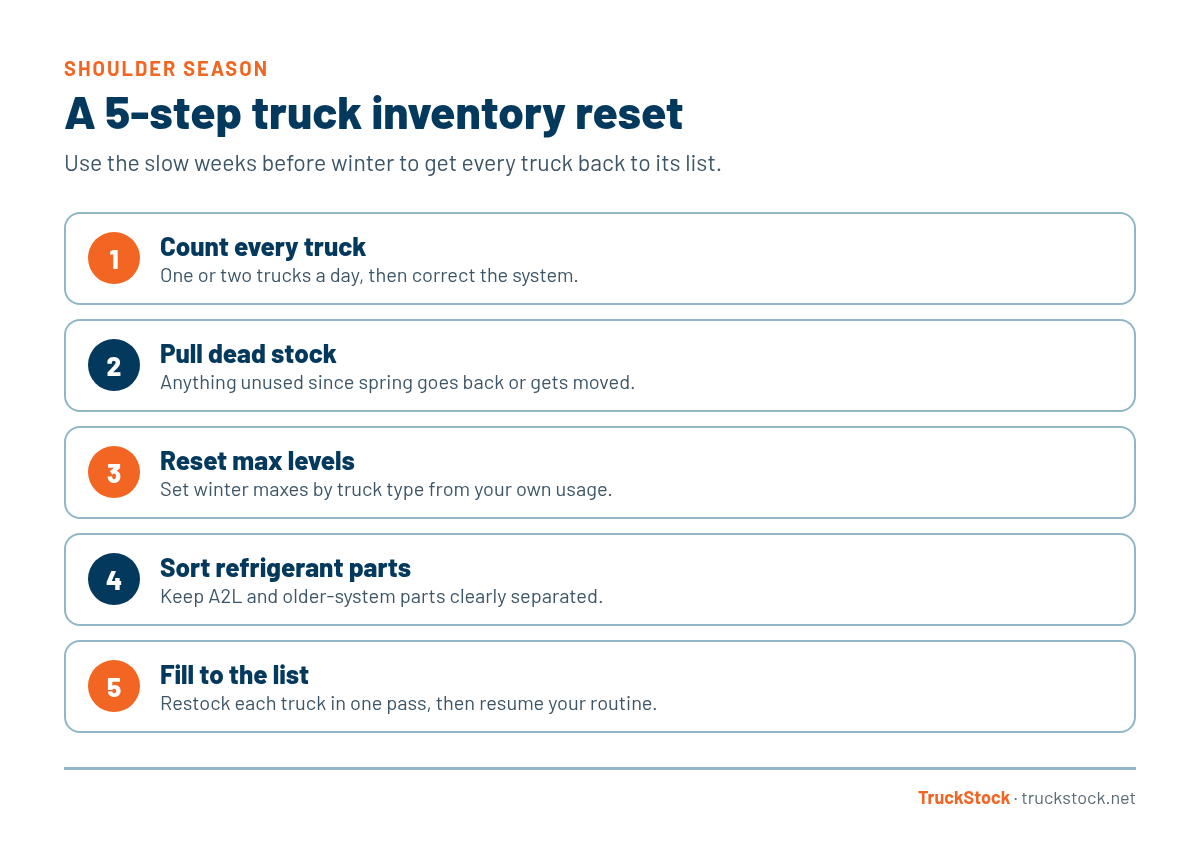
1. Count every truck
Count one or two trucks a day, then correct the system. Here’s how to do a full inventory count on a service truck, and what to do when counts don’t match.
2. Pull dead stock
Anything that hasn’t been used since spring is a candidate to come off the truck. Send it to the stockroom, return it, or move it to a truck that will use it. Here’s more on reducing dead stock on service trucks.
3. Reset max levels for winter
Base winter max levels on what your techs actually used last heating season in your area, not on a national forecast. For most HVAC trucks that means more igniters, flame sensors, and inducer parts, and fewer cooling-only parts. Set it once per truck type so every truck of that type follows. See how to set min and max levels and what an HVAC truck should carry for heating season.
4. Keep refrigerant parts sorted
If your trucks carry parts for both newer A2L systems and older equipment, make sure they’re clearly separated. In its October 19 post on the next phase of A2L adoption, ACCA reminds contractors that refrigerants and components are not interchangeable, and that repairs on A2L systems should use A2L-qualified service parts. Mixed bins make it easy to grab the wrong part.
5. Fill every truck back to its list
Once counts and max levels are right, restock each truck to its list in one pass, then go back to your normal restocking routine.
What to Keep, Pull, and Add
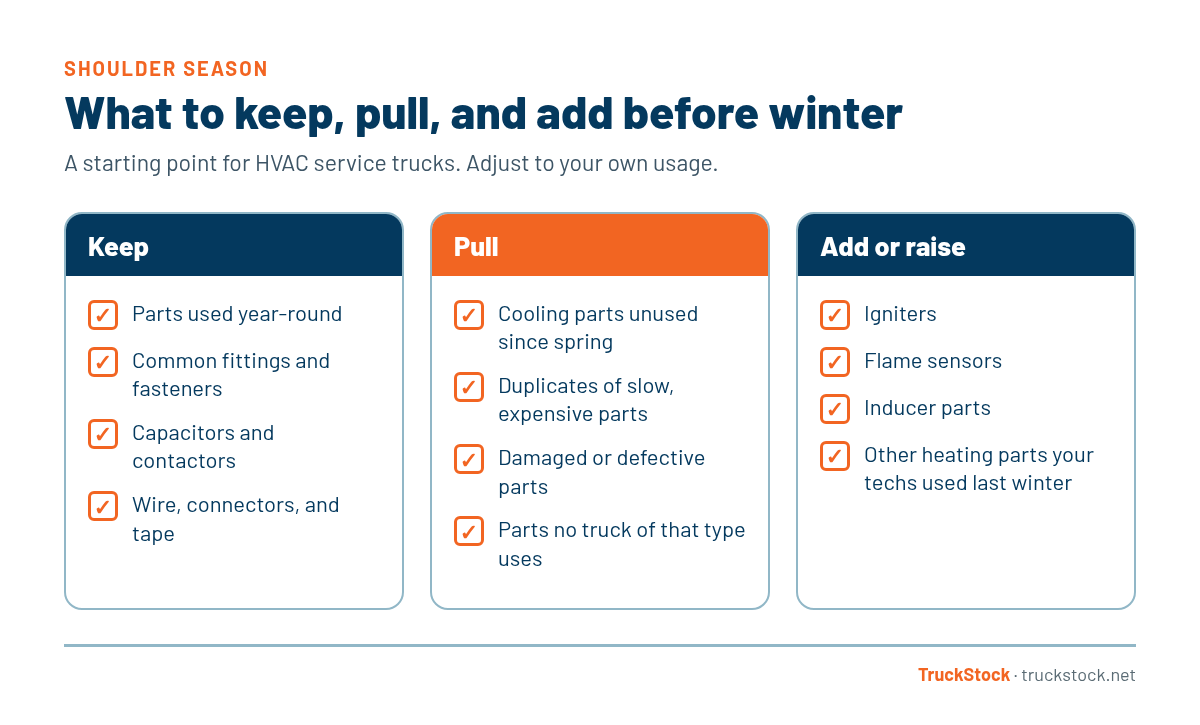
For a deeper look at swapping seasonal parts in and out, see managing seasonal rotations in service truck inventory.
A Quick Example
Picture a residential HVAC company with a handful of service trucks. In late October, the service manager counts two trucks a day while those techs ride along on maintenance calls. Each count turns up a few cooling parts that haven’t moved since August, so they go back to the stockroom. He raises the max on igniters and flame sensors for the service truck type, and every truck of that type picks up the change. By mid-November, every truck has been counted, trimmed, and filled to the new list.
Common Mistakes
- Pulling every truck in on the same day and losing a full day of calls.
- Counting trucks but never correcting the system.
- Leaving summer max levels in place all winter.
- Mixing parts for different refrigerants in the same bin.
How TruckStock Helps
- Available Stock report. See each part’s quantity against its max before you count.
- Edit Inventory. Correct a truck’s counts after a physical count, or fill a part to its max.
- Max levels by truck type. Change a max once, and every truck of that type follows.
- Items Requested report. See what actually got used last season, by part or truck.
Key Takeaways
- Use slow weeks to count trucks one or two at a time.
- Pull parts that haven’t moved since spring.
- Reset winter max levels by truck type, based on your own usage.
- Keep parts for different refrigerants clearly separated.
- Fill every truck to its list before the first cold snap.
Frequently Asked Questions
When is the best time to reset truck inventory?
Whenever call volume drops. For many HVAC shops that’s early fall and again in spring, between the heating and cooling peaks.
Should I take summer parts off the truck in winter?
Cooling parts that rarely get used in winter can usually go back to the stockroom. Keep anything your techs still use year-round.
If the winter forecast is mild, should I carry less?
Not by much. Forecasts vary by region and a single cold week can bring a rush of calls. Set max levels from your own usage history and adjust as the season goes.
Want counts and max levels in one place before winter? Start a free TruckStock trial or contact our team.
Recent Comments