
To set min and max levels for service truck inventory, start with how many of each part a truck uses between restocks. Set the max at that number plus a small cushion, limited by the space you have. Set the min (your reorder point) at the amount you need to get through the jobs a tech will run before the next restock arrives. Then use the same levels on every truck of the same type.
Levels are only half of it. You also need a routine that brings trucks back to their max, which we cover in how to keep service trucks stocked.
What Min and Max Mean on a Service Truck
- Max is the most of a part that should ever be on the truck. It keeps trucks from getting overloaded and ties up less money in parts sitting on shelves.
- Min, or the reorder point, is the lowest you’re comfortable letting a part get before it has to go back on the next restock.
- Par level is another name you’ll hear. Most people use it to mean the “full” level, which is the same idea as a max.
On a truck, the max does most of the work. If techs record parts as they use them and the stockroom refills on a schedule, the truck keeps coming back to its max.
How to Set Min and Max Levels, Step by Step
1. Pull your usage history
Look at the last 60 to 90 days of jobs, invoices, or parts requests and list how many of each part each truck type used. Even a few weeks of data beats guessing. We cover why in why reporting on parts usage improves operational decisions.
2. Set the max: typical use plus a cushion
Figure out how many you use between restocks, a typical day if you restock daily or a typical week if you restock weekly. Add a cushion for a busy stretch. For fast movers, that might be a few extra. For slow movers, one extra is usually plenty. Then check it against the space you have. A max that doesn’t fit in the bin isn’t a real max.
3. Set the min: what gets you to the next restock
Your min should cover the calls a tech is likely to run before parts can get back on the truck. If restocking happens overnight, the min can be low. If it takes a few days, raise it.
4. Handle the must-carry parts
Some parts rarely get used but will end a call if they’re missing. For those, set a max of 1 or 2 and restock as soon as one is used. These are the parts that protect your first-time fix rate.
5. Apply levels by truck type, then review
Set levels once for each truck type rather than truck by truck. Then review monthly. Raise levels on parts that keep running out, lower them on parts that never move, and adjust for the season. Here’s more on managing seasonal rotations.
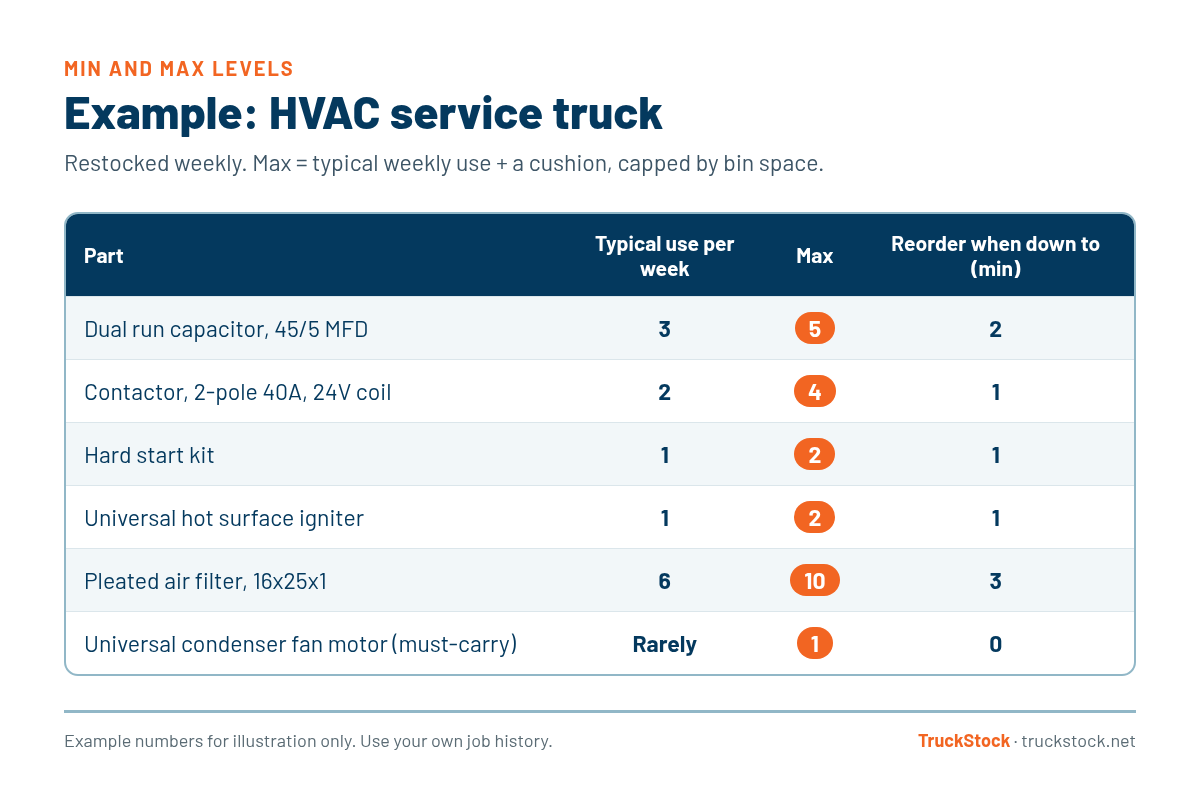
Example: Min and Max Levels on an HVAC Service Truck
Here’s what that might look like for an HVAC service truck that gets restocked weekly. These numbers are for illustration only. Your own job history should drive yours.
Don’t Forget What’s Already on Order
One of the easiest ways to overfill a truck is to forget about parts that are already on the way. The amount to send back is the max, minus what’s on the truck, minus what’s already pending. Tracking what’s pending is easier when every move is recorded, as we explain in how to track parts across multiple service trucks.

How TruckStock Handles It
- Max by truck type. Each truck type has a parts list with a max for every part, and every truck of that type follows it. A max of 0 is respected too, for parts a truck type shouldn’t carry.
- On-hand, max, and pending in one view. When a tech builds a request, each part shows something like 6/10, with an orange tag for parts already on order.
- Built-in limits. TruckStock won’t let a request push a truck past its max. If it would, it explains why in plain English, such as “Max is 10, you have 6 on the truck, and 4 are already pending.”
- Reports to tune your levels. The Items Requested report shows usage by truck, part, job, or supplier, and the Available Stock report shows each part against its max. Both download to Excel.
Key Takeaways
- Base max levels on real usage between restocks, plus a cushion, capped by space.
- Set the min so a tech can get through to the next restock.
- Give must-carry parts a small max and restock them right away.
- Subtract what’s already on order before sending more.
- Set levels by truck type and review them every month or season.
Frequently Asked Questions
How often should I review truck inventory levels?
Monthly is a good starting point, plus a review at the start of each busy season. Raise levels on parts that keep running out and lower them on parts that sit untouched.
Should every truck have the same max levels?
Every truck of the same type should. An HVAC service truck and a plumbing van need different lists, but two HVAC service trucks doing the same work should match. That makes restocking and training much simpler.
How do I set levels for parts that are rarely used?
If a part is rarely used but would stop a job if it’s missing, set a max of 1 or 2 and restock it as soon as it’s used. If it’s rarely used and not critical, consider keeping it in the stockroom instead of on the truck.
Want to try it with your own parts list? Start a free TruckStock trial and set up a truck type with max levels in a few minutes, or reach out to our team with questions.
Recent Comments