

To track parts across multiple service trucks, treat each truck as its own inventory location with its own count. Then record every time a part moves: used on a job, sent from the stockroom, received on the truck, handed to another truck, or corrected after a count. When the person doing the work records each move, you can see what’s on any truck without a full physical count.
With one or two trucks, you can usually keep it in your head. Past that, parts start disappearing between trucks, the shop, and job sites. Here’s how to keep track as your fleet grows. (If you’re still building your basic routine, start with how to keep service trucks stocked.) For why it’s worth the effort, see why inventory visibility matters more than you think.
Why Tracking Breaks Down as You Add Trucks
- The spreadsheet only gets updated by the office. By the time it’s updated, it’s already out of date.
- Techs borrow from each other. A part moves from one truck to another with a text message or no record at all.
- Nobody knows what’s already on order. So the same part gets requested twice.
- Every truck is set up differently. Without a standard, there’s nothing to compare a count against.
The Five Ways a Part Moves
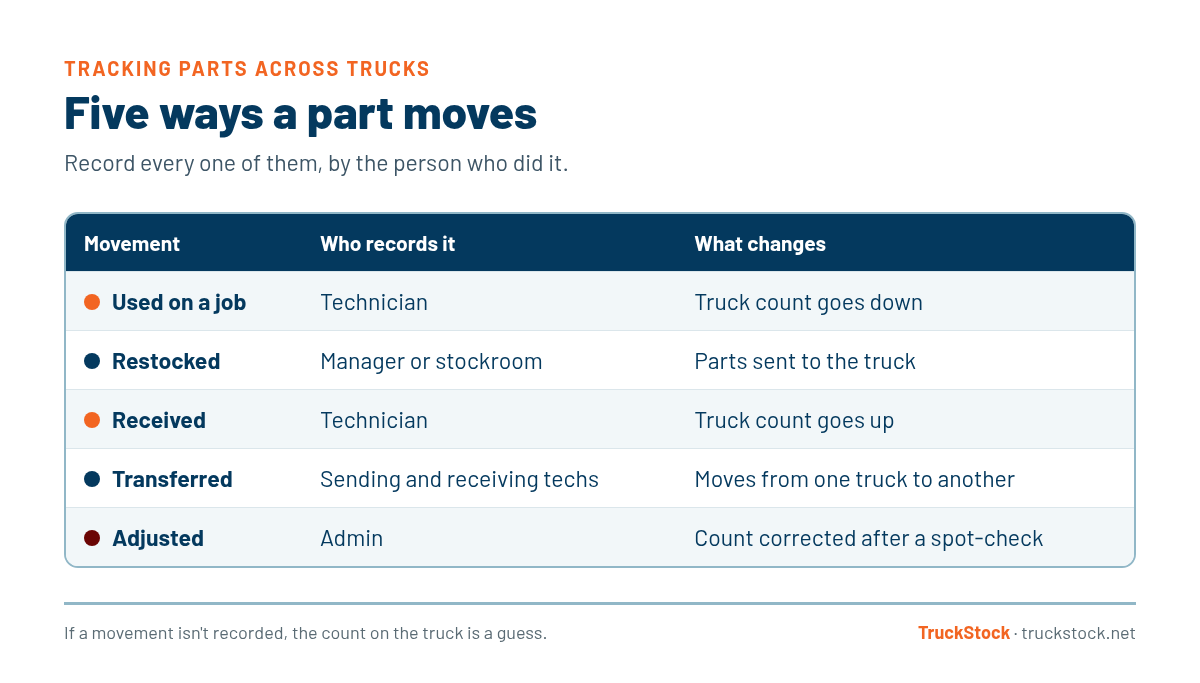
Every part on every truck changes hands in one of five ways. If you record all five, your counts stay trustworthy.
How to Set Up Multi-Truck Parts Tracking
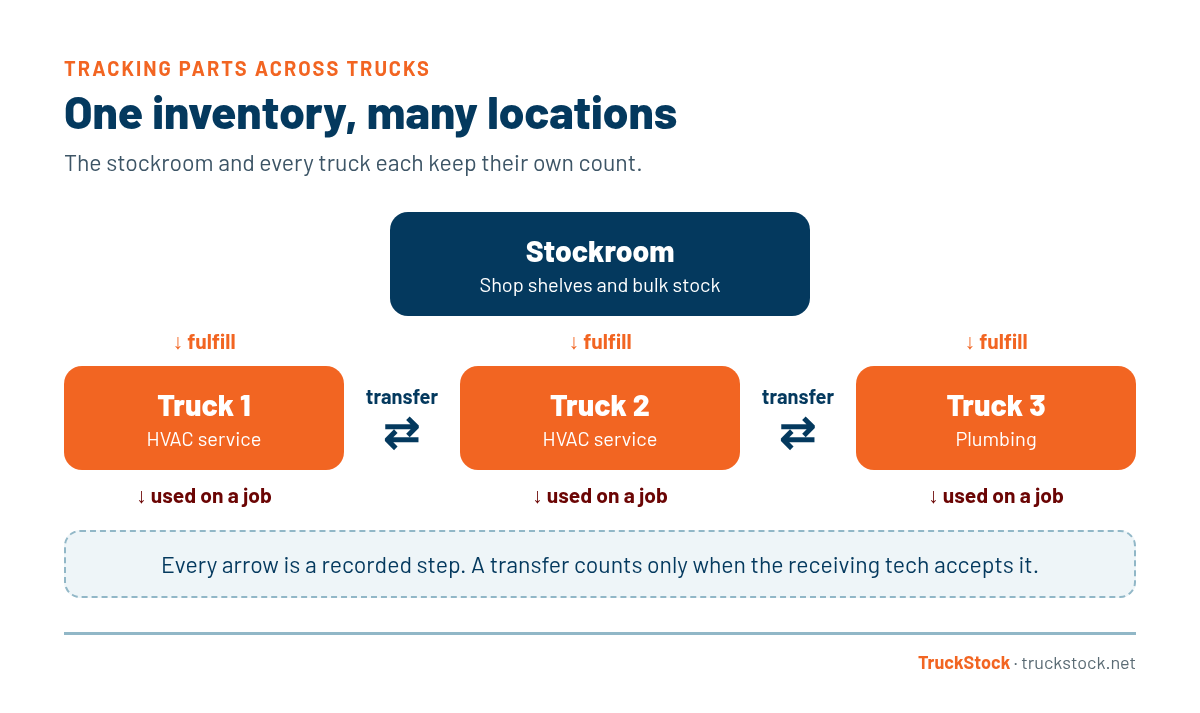
- Give every truck and stockroom its own location. Each one keeps its own count, so you always know where a part is.
- Use one parts catalog for everyone. The same part should have the same name and number on every truck, or your reports won’t add up.
- Standardize by truck type. Trucks doing the same work carry the same list and max levels. Here’s how to scale with multiple users and truck types, and how to set min and max levels for each type.
- Assign a responsible person to each truck. Someone has to own each count.
- Make recording easy on a phone. If it’s not quick, it won’t happen at the job site.
- Treat transfers as two-sided. The sending tech records it, and the receiving tech accepts it. Then both trucks stay accurate.
- Spot-check and review. Count a few bins each week, correct anything that’s off, and look at usage by truck to spot problems early.
How TruckStock Handles It
- Every truck has its own inventory. Techs and managers can see current truck inventory and a pending request list for what’s still on order.
- Transfer Stock and Accept Transfers. A tech sends parts from their truck to another, and the receiving tech accepts the transfer in one step.
- Stockrooms. Managers fulfill requests from a stockroom, and TruckStock won’t let them send more than the stockroom has on hand.
- Corrections and bulk updates. Admins can adjust counts directly, or download inventory to Excel, update it, and upload it back with a review step before anything changes.
- Reports. See items requested by truck, job, part, or supplier, and check any truck’s stock against its max. Both reports download to Excel.
- Easy to roll out. Invite your team by email, and techs can use it in their phone’s browser or add it to their home screen.
Key Takeaways
- Treat every truck and stockroom as its own inventory location.
- Record all five movements: used, restocked, received, transferred, and adjusted.
- Make truck-to-truck transfers two-sided so both counts stay right.
- Use one parts catalog and standard lists by truck type.
- Spot-check regularly and use reports to catch problems early.
Frequently Asked Questions
Can I track service truck inventory in a spreadsheet?
For a few trucks, yes, if someone keeps it up to date every day. As you add trucks and techs, spreadsheets tend to fall behind because only the office updates them. A tool techs can use from their phones keeps counts current.
How do I handle technicians borrowing parts from each other’s trucks?
Make it a recorded transfer instead of an informal swap. The sending tech logs what they handed over, and the receiving tech accepts it, so both trucks show the right count.
How often should I do a physical count of truck inventory?
If usage, restocks, and transfers are recorded as they happen, you rarely need a full count. Spot-check a few bins on each truck every week or two, and do a full count when something looks off.
Do technicians need to install an app?
Not for TruckStock. It’s a mobile-friendly website that works in any phone browser and can be added to the home screen so it opens like an app. A native app is on the roadmap.
How much does truck inventory software cost?
It varies by product. Many field service suites price per technician. TruckStock is priced per vehicle, at $25 per vehicle per month standard, with volume pricing starting at $20.
If you’re ready to see every truck in one place, start a free TruckStock trial. It comes with sample trucks and parts so you can try transfers and reports right away. Or contact us and we’ll help you plan your setup.
Recent Comments