

To manage supplier part numbers and costs for truck stock, store each supplier’s part number and your current cost directly on the part in your catalog, record more than one supplier when you buy from several, and update them in bulk whenever a supplier sends a new price list. Then use those costs in your reports to see what your trucks really use in dollars.
Supplier information usually lives in a mess of places: old invoices, a spreadsheet on someone’s desktop, and the memory of whoever does the ordering. That works until that person is out sick, a supplier changes its numbers, or prices jump and nobody notices. Keeping it with the part itself makes ordering faster and your numbers more honest. If your catalog needs work first, start with how to organize a parts catalog.
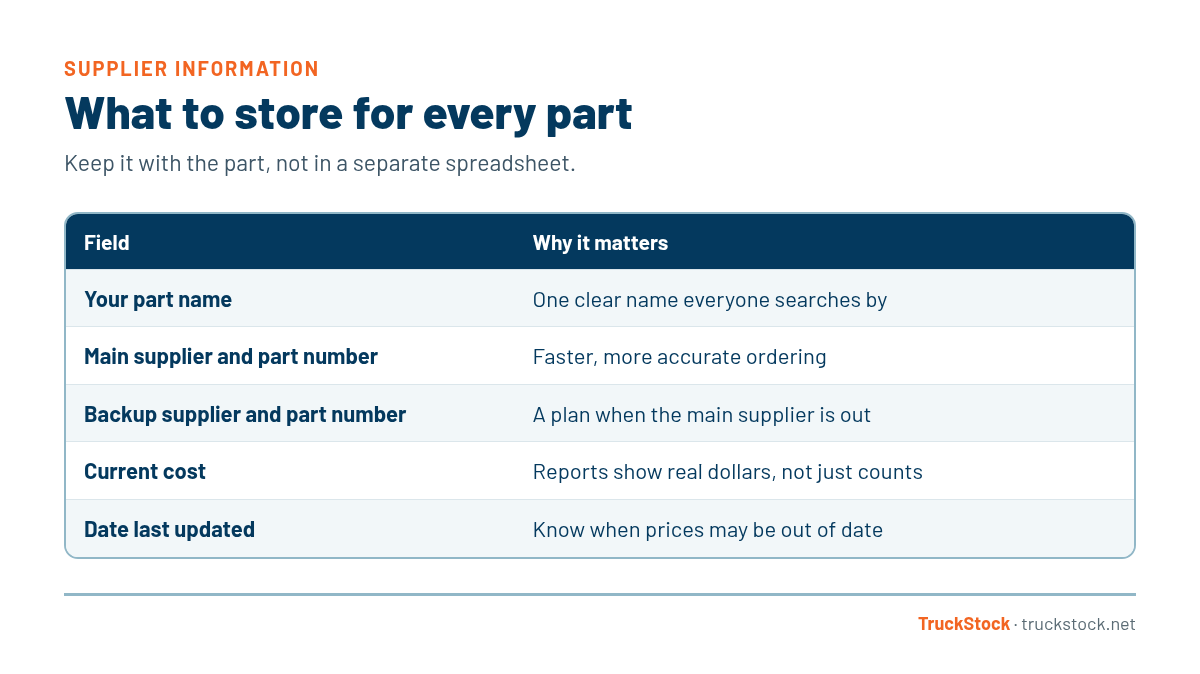
What to Store for Every Part
How to Keep Supplier Information Up to Date
1. Start with your main suppliers
Most service companies buy the bulk of their truck stock from a small number of suppliers. Start there. Match each part in your catalog to that supplier’s part number, and fill in your current cost from a recent invoice or price list.
2. Record a backup supplier
When a part is out of stock at your main supplier, you want to know where else to get it without starting from scratch. Recording a second supplier and their part number takes a few minutes now and saves a lot of scrambling later.
3. Update costs in bulk
Updating prices one at a time is how they fall out of date. When a supplier sends a new price list, update every affected part at once from a spreadsheet, and review the changes before they’re applied so a typo doesn’t become a new price.
4. Keep a history
Know when costs changed and by how much. That history is useful when you review your own pricing to customers, and it helps you notice when a supplier’s prices are creeping up faster than others.
5. Use costs in your reports
Once costs are on every part, your usage reports can show dollars, not just counts. That tells you which trucks, jobs, and parts drive the most spending. Our post on reporting on parts usage explains how to put that to work.
Common Mistakes
- Keeping supplier numbers in a separate spreadsheet from the catalog.
- Updating costs only when someone happens to notice a change.
- Recording only one supplier, with no backup.
- Typing price changes in one at a time and making mistakes.
- Never looking at parts spend in dollars.
A Quick Example
Say your main supplier raises prices on a group of fittings in the spring. If costs live on each part and you update them in bulk from the new price list, your reports pick up the change right away. You can see which trucks and job types use those fittings most, and decide whether to adjust your own pricing or look at a second supplier.
Without that, the change hides inside invoices for months. By the time someone notices, you’ve been charging the old price on dozens of jobs. A few minutes of upkeep each time a price list arrives is a lot cheaper than finding out the hard way.
How TruckStock Handles It
- Suppliers on every part. Each part can list the suppliers that carry it, with their part numbers and costs.
- CSV supplier uploads. Upload a CSV of supplier part numbers and costs, review every change, and then apply it.
- Upload history. Past uploads are kept, so you can see what changed and when.
- Supplier reporting. The Items Requested report can be grouped by supplier, with subtotals and a supplier chart, and downloads to Excel.
Key Takeaways
- Store supplier part numbers and costs on each part.
- Record a backup supplier for important parts.
- Update costs in bulk from price lists, with a review step.
- Keep a history of cost changes.
- Use costs in reports to see real parts spend.
Frequently Asked Questions
How often should supplier costs be updated?
Whenever a supplier sends a new price list, and at least once or twice a year otherwise. Bulk updates make this quick.
Should I track list price or my actual cost?
Your actual cost. That’s what your reports should be based on, since it’s what you really pay.
What if two suppliers use different part numbers for the same part?
Record both on the same part in your catalog. One part, many supplier numbers keeps your counts and reports in one place.
Does supplier information help with ordering?
Yes. When the stockroom runs low, having the supplier and part number right on the item makes reordering much faster and reduces wrong orders.
Want to see supplier uploads in action? Start a free TruckStock trial or contact our team.
Recent Comments