

Good service truck inventory software tracks every truck as its own inventory location, is fast enough for techs to use on a phone at the job, closes the loop from parts used to parts restocked to parts received, and gives managers clear reports. It should also be easy to set up and priced in a way that makes sense for your fleet.
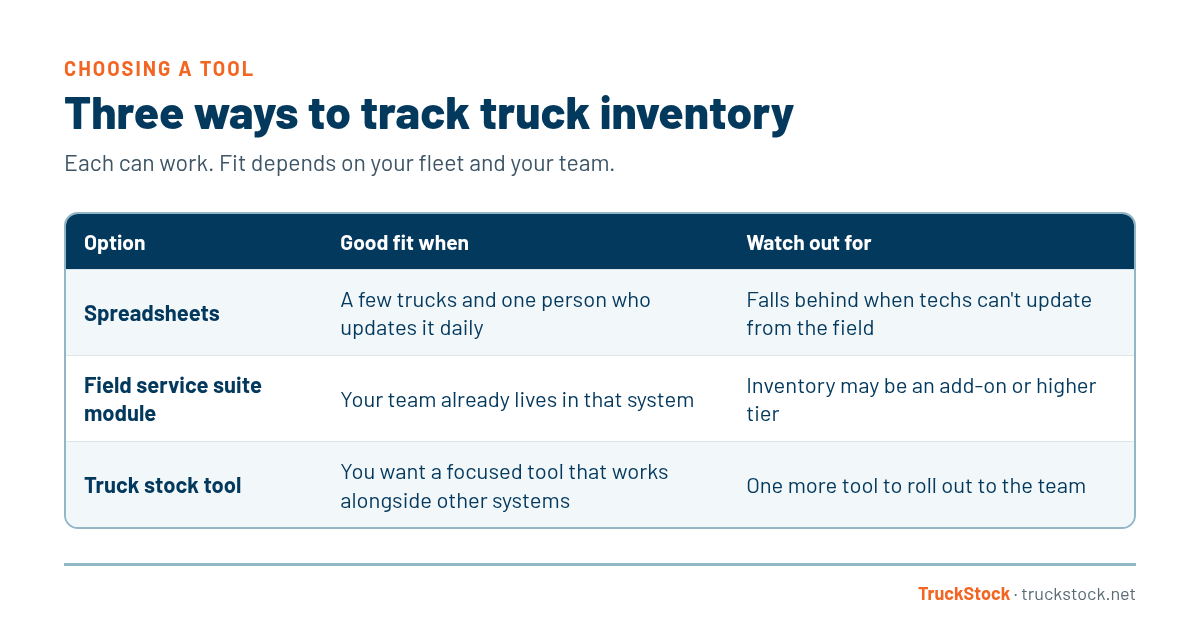
You have three basic options: spreadsheets, the inventory module inside a full field service management suite, or a tool built specifically for truck stock. Each can work. The right choice depends on how many trucks you run, how much your techs will actually use, and how much you want to change the rest of your systems. If you’re still deciding whether it’s worth the effort, start with why inventory visibility matters.
Three Ways to Track Truck Inventory
What to Look For, Feature by Feature
1. Each truck as its own location
You need to know what’s on each truck, not just what’s in the building. Look for per-truck counts, stockrooms as separate locations, and a way to move parts between them. Here’s more on tracking parts across multiple service trucks.
2. Fast for techs on a phone
If recording a part takes more than a few taps, techs will put it off. Try the tech side yourself on a phone, standing next to a truck, before you decide.
Watch for small things: how many screens it takes to submit a request, whether parts are easy to find by category, and whether the screen is readable outside in bright light. Those details decide whether techs use it every day or only when someone reminds them.
3. A closed restocking loop
Recording usage is only half the job. The tool should show what each truck needs, let the stockroom fill it, and let techs confirm what arrived. That loop is what keeps counts accurate, as we explain in how to keep service trucks stocked.
4. Standard truck types and max levels
Look for a way to define a parts list and max quantities for each kind of truck. That makes adding trucks and restocking much simpler. Our post on min and max levels covers why this matters.
5. Reports you’ll actually use
At minimum, you want usage by truck, part, and job, and a view of each truck against its max. Excel export is a plus, since many managers like to dig in on their own.
6. Simple setup and clear pricing
Ask how your existing parts lists get loaded, whether spreadsheets can be imported, and how pricing scales as you add trucks or techs.
Questions to Ask Before You Buy
- Can I try it with sample data before I commit?
- How do my techs sign in, and do they need to install anything?
- How do I load my current parts lists and truck counts?
- Is pricing per technician, per truck, or something else?
- Does it work alongside the other systems we already use?
How TruckStock Handles It
- Built for truck stock. Request, fulfill, and receive, plus truck-to-truck transfers and stockrooms.
- Works on any phone. It runs in the browser and can be added to the home screen. Users sign in with their email address.
- Easy setup. Truck types with max levels, CSV import for parts templates, and Excel upload for inventory.
- Per-vehicle pricing. $25 per vehicle per month standard, with volume pricing from $20, and a free trial that comes loaded with sample data.
Key Takeaways
- Track every truck and stockroom as its own location.
- Test the tech experience on a real phone at a real truck.
- Make sure it closes the loop from used to restocked to received.
- Look for truck types with max levels and useful reports.
- Understand setup and how pricing grows with your fleet.
Frequently Asked Questions
Is a spreadsheet good enough for truck inventory?
For a handful of trucks with one person keeping it up to date daily, it can be. As the fleet grows, spreadsheets fall behind because techs usually can’t update them from the field.
Should I use my field service software’s inventory module?
If it fits your workflow and your techs use it, that can be a good option. Some companies prefer a focused truck stock tool that works alongside their existing system instead of changing everything at once.
How long does it take to set up truck inventory software?
It depends mostly on how clean your parts lists are. If you already have a standard list per truck type, setup can be quick. If not, plan time to build those lists first.
Do technicians need training to use truck inventory software?
A little. A short walk-through on day one and some practice on real jobs is usually enough if the tool is simple.
The best way to judge is to try it. Start a free TruckStock trial with sample trucks and parts, or contact our team with questions.
Recent Comments