

Start by counting every truck and shelf you just took on, so you know what you actually own. Then merge the two parts catalogs into one list with one name and number per part, decide which truck lists to keep, and move everyone onto the same request and restock process. Go one branch or crew at a time, and keep the acquired team involved, since they know their trucks best.
Acquisitions are everywhere in the trades right now. On November 3, Southern Home Services announced it acquired Vanderford Air and Plumbing in League City, Texas, its second location in the Houston market. On November 19, Caltius Equity Partners announced a partnership with Medford Wellington, a New England commercial HVAC, refrigeration, plumbing and electrical company that plans to keep pursuing add-on acquisitions.
Every deal eventually raises a practical question: how do we get these trucks working the way ours do? Here’s a simple way to do it.
Why Merging Truck Inventory Is Tricky
- Two names for the same part. One company calls it a “run cap,” the other lists it by supplier number.
- Different truck lists. Each company built its truck stock around its own work and its own habits.
- Different processes. One team texts the office for parts, the other uses a clipboard or a spreadsheet.
Five Steps to Combine Truck Inventory
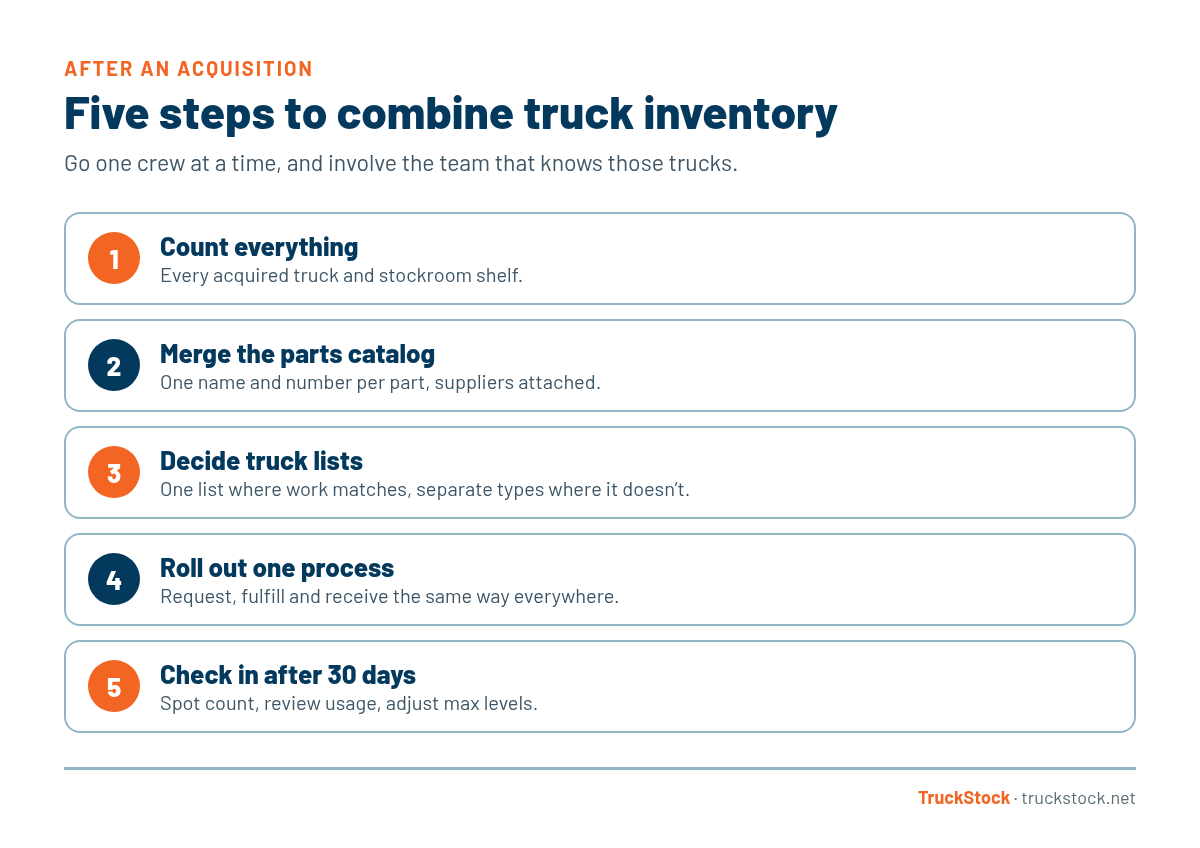
1. Count everything you just acquired
Before changing anything, count every acquired truck and stockroom shelf. It gives you a clean starting point and often turns up forgotten dead stock. Our guide to doing a full inventory count on a service truck walks through it.
2. Merge the parts catalog
Put both parts lists side by side and match up duplicates. Pick one name and one part number for each item, and keep each supplier’s part number and cost attached to it. Here’s more on organizing a parts catalog and managing supplier part numbers and costs.
3. Decide which truck lists to keep
Compare what similar trucks carry at each company. Where the work is the same, settle on one list and one set of max levels. Where the work is different, like a plumbing crew joining an HVAC shop, keep a separate truck type. Our post on standardizing truck inventory across locations covers this, and setting min and max levels helps with the numbers.
4. Roll out one request and restock process
Move the acquired techs onto the same way of requesting, fulfilling and receiving parts that your other trucks use. Show them on their own truck, not in a meeting room. Our tips on onboarding technicians to truck stock procedures and getting techs to use inventory software apply here too.
5. Check in after 30 days
Do a quick spot count and compare it to the system. Look at what’s being requested most and what never moves, and adjust lists and max levels. If counts are off, here’s what to do when truck counts don’t match the system.
What to Keep and What to Standardize
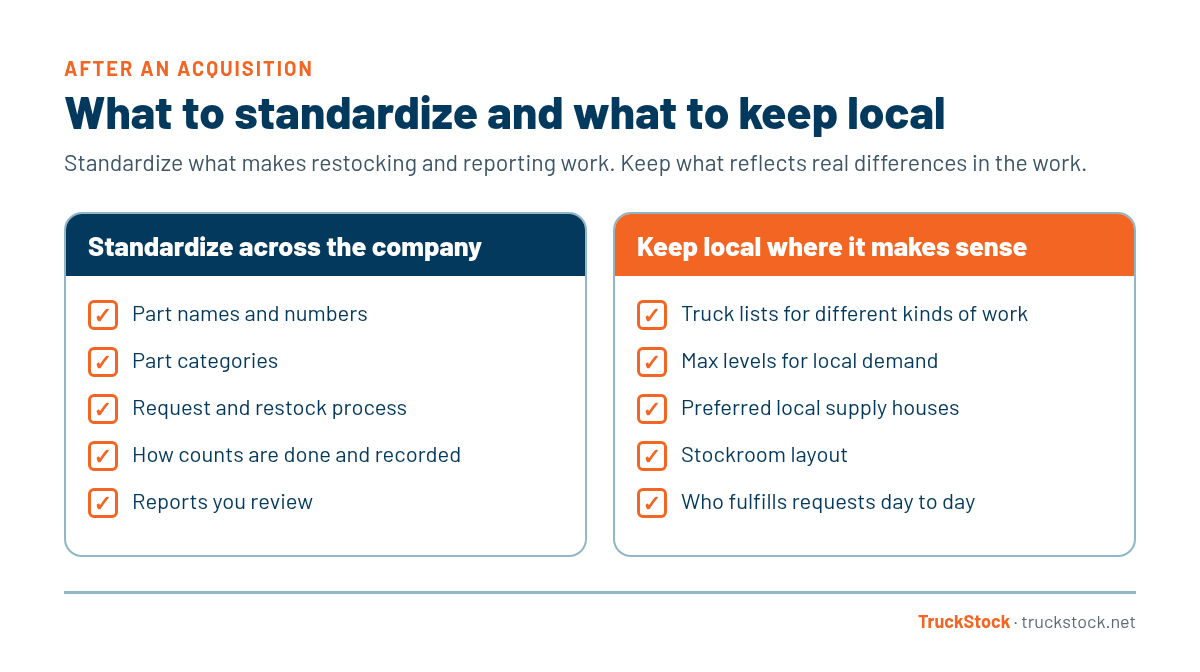
A good rule: standardize the things that make reporting and restocking work across the company, and keep local the things that reflect real differences in the work.
A Quick Example
Picture an HVAC company with 12 trucks that buys a plumbing shop with 5 vans. In week one, the plumbing techs count their vans. In week two, the office merges the parts lists and finds the same fittings listed under different names. The plumbing vans become their own truck type, while shared items use one name and number. By month’s end, every tech requests parts the same way, and the manager sees all 17 trucks in one place.
Common Mistakes
- Copying the acquired company’s spreadsheet into your system without counting first.
- Forcing every truck onto one list when the work is genuinely different.
- Changing names, suppliers and processes all on the same day.
- Leaving the acquired team out of decisions about their own trucks.
How TruckStock Helps
- Departments, trucks and stockrooms. Add the acquired crew as its own department with its own trucks and stockroom.
- Truck types. Set one parts list and max levels per kind of truck, and keep separate types where the work differs.
- Suppliers. Keep each supplier’s part number and cost on the same part.
- Excel upload with review. Update inventory from a spreadsheet and review the rows before they’re applied.
- Transfer Stock. Move parts between trucks and keep both counts accurate.
Key Takeaways
- Count every acquired truck and shelf before changing anything.
- Merge the parts catalog so each part has one name and number.
- Standardize truck lists where the work is the same, and keep separate types where it isn’t.
- Move everyone onto one request and restock process, one crew at a time.
- Check counts and usage after 30 days and adjust.
Frequently Asked Questions
How long does it take to combine truck inventory after an acquisition?
It depends on how many trucks you added and how organized the acquired company was. Counting and merging the catalog are usually the biggest jobs.
Should the acquired company keep its own truck lists?
Keep them where their work is genuinely different. Where both companies do the same work, settle on one list so restocking and reporting are consistent.
What if both companies use different suppliers?
You don’t have to pick one right away. Keep each supplier’s part number and cost on the same part, then decide later based on price and service.
Can we merge inventory if the acquired company tracked it in spreadsheets?
Yes, but count first so you’re not importing old numbers. Our post on moving truck inventory from spreadsheets to software has more.
Bringing new trucks into the fold? See every truck, stockroom and part in one place. Start a free TruckStock trial or contact our team.
Recent Comments